RainbowIndent
Makes indentation easier to read.
By
jfcherng
Created
Installations minus removals
Upgrades
- 1,710 installs
- 20 stars
Links
Versions
2.0.2
(>ST4202)
·
1.0.0
(>ST4200)
·
0.1.6
(>ST4168)
·
ST-RainbowIndent







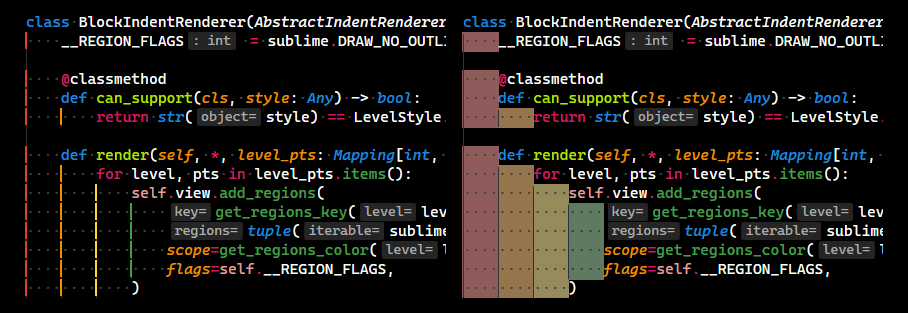
Makes indentation easier to read.
This is a simple conceptual clone of the Indent Rainbow VSCode extension.
Installation
This package is available on Package Control by the name of RainbowIndent.
FAQ
How to Customize Indent Colors?
First, you have to decide how many colors you want to use for indents.
Say, if you want to use 6 colors, add the following into plugin's level_colors setting.
"level_colors": [
    "region.indent.0",
    "region.indent.1",
    "region.indent.2",
    "region.indent.3",
    "region.indent.4",
    "region.indent.5",
],
These region.indent.0 ... region.indent.5 are called scopes in Sublime Text.
Names of scope aren't important but I just feel these names are self-explanatory.
Next, you have to add coloring rules into your color scheme for those scopes.
For example, adding the following rules into your color scheme.
foregroundis the indent line color whenlevel_styleis set toline.backgroundis the indent background color whenlevel_styleis set toblock.
Valid color formats are listed on Sublime Text's official document.
///////////////////
// RainbowIndent //
///////////////////
{
    // red
    "foreground": "rgba(229, 57, 53, 0.35)",
    "background": "rgba(229, 57, 53, 0.2)",
    "scope": "region.indent.0",
},
{
    // green
    "foreground": "rgba(67, 160, 71, 0.35)",
    "background": "rgba(67, 160, 71, 0.2)",
    "scope": "region.indent.1",
},
{
    // blue
    "foreground": "rgba(30, 136, 229, 0.35)",
    "background": "rgba(30, 136, 229, 0.2)",
    "scope": "region.indent.2",
},
{
    // orange
    "foreground": "rgba(251, 140, 0, 0.35)",
    "background": "rgba(251, 140, 0, 0.2)",
    "scope": "region.indent.3",
},
{
    // purple
    "foreground": "rgba(142, 36, 170, 0.35)",
    "background": "rgba(142, 36, 170, 0.2)",
    "scope": "region.indent.4",
},
{
    // cyan
    "foreground": "rgba(0, 172, 193, 0.35)",
    "background": "rgba(0, 172, 193, 0.2)",
    "scope": "region.indent.5",
},
How to Disable Rendering by Default and Enable Manually?
You can set the enabled_selector plugin setting to "nothing".
Because no scope is named nothing, this plugin won't render indents.
Then, you can enable rendering manually by one of the following ways.
- From the command palette:
RainbowIndent: Enable for This View (Forced) - From the context menu:
RainbowIndent»Enable for This View (Forced) - Create and trigger a keybinding for the
rainbow_indent_view_togglecommand for convenience.
Known Issues
- There is no way to draw a region, where is no character, via ST's plugin APIs.