This package will load the environment variables that Mise provides when you open a project and clean up after itself after changing.
This feature looks through the folders configured in your sublime-project file, trying to find any that have a mise.toml or mise.local.toml in its root.
The package will load environments from any top-level folders, but it will give priority to ancestors when there are clashes.
I'll illustrate with an example: if your directory structure is like this:
root
├── mise.toml (defines FOO=1)
└── server
    ├── mise.toml (defines BAR=2)
    └── component
        └── mise.toml (defines BAZ=3 and FOO=9)
This package will load the following variables:
FOO=1
BAR=2
BAZ=3
Build system
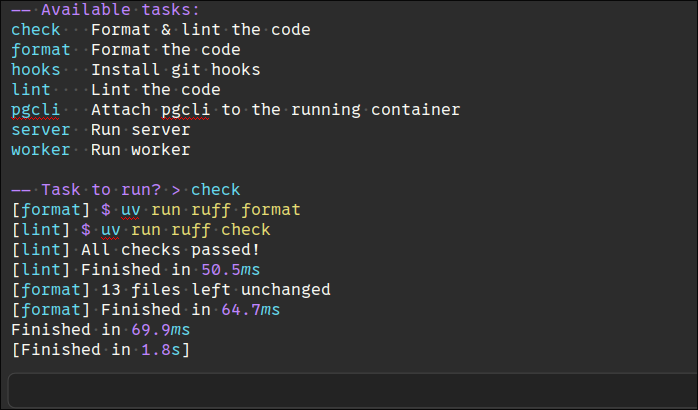
The package provides a build system for the mise task runner. When using the provided build system it will:
List available tasks
Interactively prompt you for a task to run
Execute that task and how syntax-highlighted output in Sublime Text's build output panel
Commands
Another way of interacting with Mise is through the "Mise: Run task" command, available in the Command Palette. This will fetch the available tasks defined in your project and give you a menu to select from. The selected task will be ran.
There is also a command to execute mise trust from the editor. It is available in the Command Palette as "Mise: Trust config".
In order to find the directory from which to run Mise for a command, the preference is:
The directory of the currently-open file.
The first directory you have in the sidebar/project.
Your $HOME directory.
Installation
Package Control
Open the Command Palette (Ctrl+Shift+P or Cmd+Shift+P)
Search for "Package Control: Install Package"
Search for "Mise" and install
Manual
Put this repository inside your Sublime Text Packages folder.
It hasn't been tested on Windows. Let me know if it works or not so I can fix it/remove this line.
Doesn't support all the config file paths Mise supports. That means if you store your mise config in e.g. mise/config.toml, Sublime won't automatically offer you Mise as an option for building. Environment loading also won't work.
Planned features (read: will likely never bother, feel free to open a PR)
Performance: checking mise config ls --tracked-configs might be faster than upglobbing or trying to check if any folder has a mise config. (This also fixes item #2 above). Note this requires mise v2025.1.5 or newer.
A "Mise Exec" build system that prompts the user for any command and does mise exec -- $input