Confluence
Sublime Text 3 plugin for integrate with Atlassian Confluence
By
Kevin Li
Created
Installations minus removals
Upgrades
- 1,919 installs
- 8 stars
Links
Versions
1.0.9
·
SublimeConfluence
Sublime Text plugin for integrating with Atlassian Confluence
Requires Sublime Text build 4215 or newer (Python 3.14 plugin host).
Installation
Use sublime package manager
- you should use sublime package manager
- use
cmd+shift+pthenPackage Control: Install Package - look for
Confluenceand install it.
Manually
At the moment Git is required to install the plugin. You will need to clone the repository in your Sublime Text "Packages" directory:
git clone git@github.com:mlf4aiur/SublimeConfluence.git "Confluence"
The "Packages" directory is located at:
- OS X:
~/Library/Application Support/Sublime Text */Packages/ - Linux:
~/.Sublime Text */Packages/ - Windows:
%APPDATA%/Sublime Text */Packages/
Development
Use uv to set up the dependencies for local development:
uv sync
To enable reStructuredText support, install its optional dependency:
uv sync --extra rst
This development environment does not replace Package Control's dependency installation for Sublime Text.
Package Control does not resolve transitive library dependencies like pip or
uv. dependencies.json explicitly lists Requests and its required libraries;
Sublime Text supplies certifi in the plugin host.
Settings
Open Preferences: Confluence Settings from the Command Palette, or use
Preferences > Package Settings > Confluence > Settings. The default settings
open on the left and your editable user settings open on the right. If no user
settings file exists, the command creates an empty settings buffer.
Add the following to the user settings on the right and save:
{
    "base_uri": "https://confluence.example.com/confluence/rest/api",
    "default_space_key": "ENG",
    "username": "username",
    "password": "password",
    "verify_ssl": true
}
verify_ssl accepts either the boolean true (the default) or a quoted path
to a PEM CA bundle. For example:
"verify_ssl": "/etc/ssl/certs/company-ca-bundle.pem"
On Windows, escape backslashes in the path, for example
"verify_ssl": "C:\\Certificates\\company-ca-bundle.pem". Disabling
certificate verification is not recommended.
If the password is unset, you need to input it every time. Avoid editing the password inline; this plugin cannot handle that correctly.
Missing libraries after upgrading
If the console reports ModuleNotFoundError: No module named 'urllib3', update
Confluence, then run Package Control: Satisfy Libraries from the Command
Palette and restart Sublime Text. This installs any missing declared libraries
into Sublime Text's Python environment.
Usage
Demo
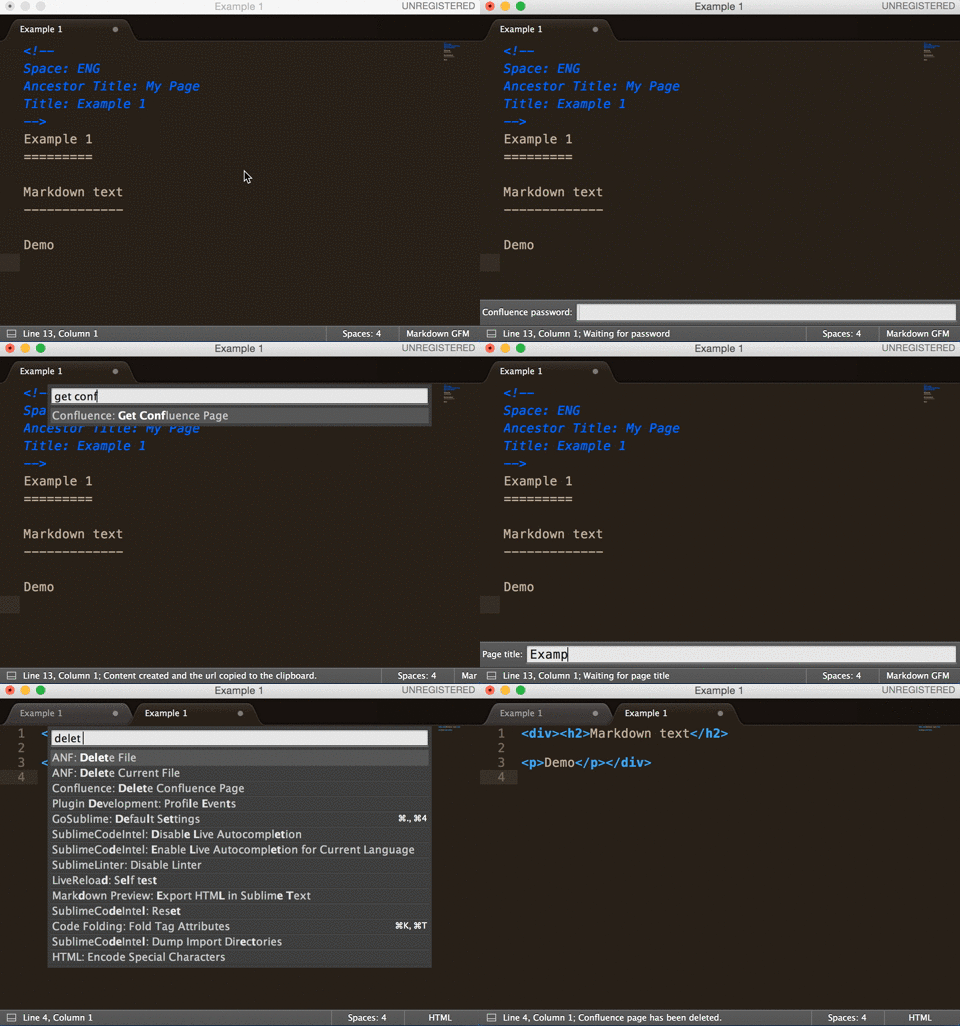
Post page to Confluence
Supported markup languages:
- Markdown, depends on python-markdown2
- reStructuredText, depends on docutils
META data must be at the head of the document, separated from the content by a newline.
Example files: example.md, example.rst.
META data:
- Space
- Ancestor Title
- Title
Use the Command Palette to run it: press cmd+shift+p, then choose
Post page to Confluence to post the local page remotely.
BTW
Confluence supports built-in markup (Textile-like) and Markdown syntax insertion.
In Confluence edit mode, press command+shift+D to insert markup text.
License
SublimeConfluence is BSD Licensed.